What is the GDID? How Windows Device IDs Are Beating VPN Anonymity
For years, security experts and privacy advocates believed that using a VPN and rotating IP addresses was the gold standard for online anonymity. However, a recent high-profile case has shattered that assumption.
In the arrest of Peter Stokes, a 19-year-old alleged member of the “Scattered Spider” hacking group, investigators utilized a new, persistent identifier within Windows 11 known as the GDID. This discovery has raised serious questions about the privacy capabilities of modern operating systems and how easily digital anonymity can be pierced by law enforcement.
What is the GDID?
GDID stands for Global Device Identifier. It is a persistent 64-bit unique identifier assigned to every Windows 11 installation.
Unlike standard browser cookies or temporary session IDs, the GDID is baked into the operating system itself. Its key characteristics include:
- Persistence: It remains constant even if the user wipes the hard drive, reinstalls Windows, or changes their network configuration.
- Network Independence: It is transmitted alongside network traffic regardless of whether the user is on a home network, a public Wi-Fi, or behind a VPN.
- OS-Level Access: It is generated by the Windows kernel, meaning it can be accessed by applications and system services without user intervention.
In short, the GDID acts as a permanent “fingerprint” for the physical device, distinct from the user’s identity or location.
The Peter Stokes Case: How Anonymity Failed
The real-world implications of the GDID were highlighted in the investigation of the Scattered Spider ransomware group. In May 2025, 19-year-old Peter Stokes allegedly executed a ransomware attack on a luxury jeweler.
To avoid detection, Stokes employed sophisticated obfuscation techniques:
- VPNs: He routed his traffic through a VPN.
- IP Rotation: He rotated his IP addresses across three different countries to mask his physical location.
Despite these measures, the GDID remained constant. When Stokes used the tunneling service ngrok to set up his attack infrastructure, the application transmitted the GDID to the ngrok servers. This created a permanent link between the anonymous attack device and the specific Windows installation.
The Investigation Chain
- The Link: Investigators obtained the GDID associated with the ngrok account used during the breach.
- Correlation: They cross-referenced this GDID with logs from Stokes’s personal Snapchat and Facebook accounts, which also collect device identifiers.
- The Break: Even though the IP addresses were different during the attack, the GDID proved that the same physical device was used for both the attack and his personal social media.
- The Arrest: This correlation allowed the FBI to pinpoint Stokes’s real-world identity and location, leading to his apprehension in Finland in April 2026.
How Bad Actors and Law Enforcement Use GDID for Tracking
The Stokes case demonstrates that the GDID can be used to track users in ways that traditional anonymity tools cannot stop.
1. Bypassing Network Anonymity
Traditional tools like VPNs and Tor work by hiding your IP address. However, if an application (like ngrok, a game launcher, or a system update) queries the GDID, that identifier is sent inside the encrypted packet. The server sees the masked IP, but it also sees the unchanging GDID.
2. The “Master Key” for Correlation
If a bad actor or law enforcement agency has access to data from two different services (e.g., a cloud service and a social media app), they can use the GDID to merge those profiles.
- Service A sees Device ID
Xconnecting from IPA(in Country 1). - Service B sees Device ID
Xconnecting from IPB(in Country 2). - Result: The attacker knows that the user in Country 1 and Country 2 is the same person, regardless of the IP addresses used.
3. Persistent Device Profiling
Because the GDID is tied to the OS installation, it allows for the creation of a long-term profile of a user’s behavior. Even if a user deletes cookies or clears their browser history, the GDID remains a constant thread that can be used to re-identify the device.
Privacy Implications: Is Windows “Surveillance Software”?
The revelation of the GDID and its use in the Stokes case has led experts to describe modern Windows as potential “surveillance software.“
- The End of IP-Based Anonymity: The belief that a VPN guarantees anonymity is now flawed. If the OS leaks a persistent ID, the network layer is insufficient for high-stakes privacy.
- Centralized Data: The fact that Microsoft provided this data to the FBI underscores the risk of centralized data collection. While this aided in catching a criminal, it also proves that the government can easily pierce the veil of anonymity.
- User Control: Most users are completely unaware that their device has a persistent ID that is transmitted to third-party services like ngrok, Microsoft services, or even games.
How to Protect Yourself
While you cannot easily change the GDID (as it is deep in the OS), there are steps you can take to reduce tracking risks:
- Limit Application Permissions: Be cautious about which apps you grant network access to, especially those that run in the background.
- Use Privacy-Focused Operating Systems: Consider using operating systems that do not enforce persistent device IDs or allow you to disable telemetry more effectively.
- Network Anonymity (Advanced): For high-risk scenarios, standard VPNs are no longer enough. Security experts recommend using Tails OS (a live operating system that routes everything through Tor and does not persist data) or Qubes OS for compartmentalization.
- Device Isolation: For sensitive work, use a dedicated device that is never logged into personal accounts (like Facebook or Snapchat) to prevent the correlation step described in the Stokes case.
- Alternatively Use a Udid Changer Script such as this one https://github.com/gd03gd031/Windows-GDID-Changer note that if the script times out it still should change your GDID. To check run powershell as admin and type:
- $lid=(Get-ItemProperty ‘HKCU:\SOFTWARE\Microsoft\IdentityCRL\ExtendedProperties’).LID; “g:$([Convert]::ToUInt64($lid,16))”
- this will display your current GDID & after you change your GDID be sure to restart your pc for it to take effect.
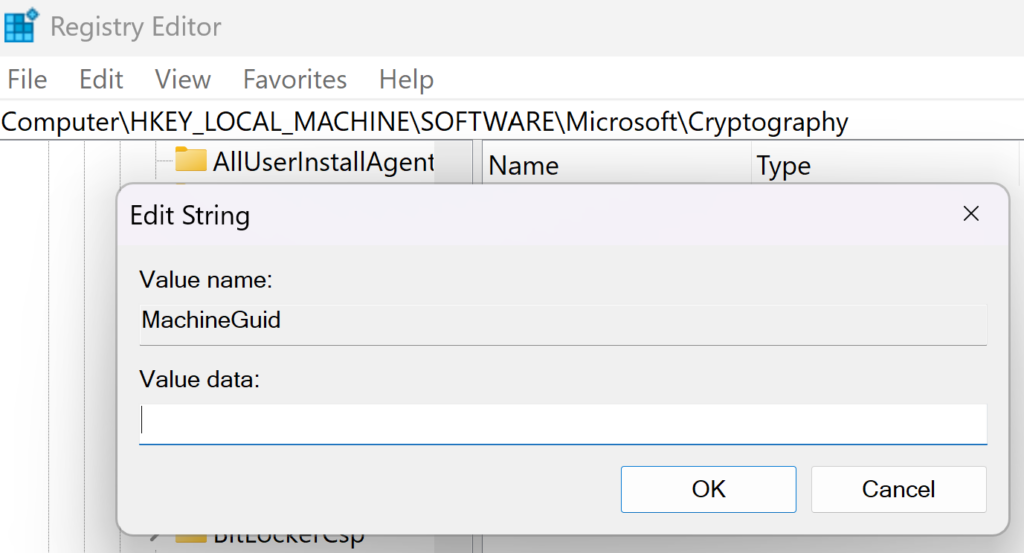
- also note that you should change your GUID also under registry Computer\HKEY_LOCAL_MACHINE\SOFTWARE\Microsoft\Cryptography
- here is a batch script to generate a new GUID:
- @echo off
:: Set the output file path in the user’s Documents folder
set “outputFile=%USERPROFILE%\Documents\random_guids.txt”
:: Clear the file if it exists
“%outputFile%” echo.
echo Generating 50 random GUIDs…
:: Use PowerShell to generate 50 new GUIDs and write them to the file
powershell -Command “1..50 | ForEach-Object { [guid]::NewGuid() } | Out-File -FilePath ‘%outputFile%’ -Append”
echo Done! 50 GUIDs saved to:
echo %outputFile%
:: Optional: Open the file automatically
:: start “” “%outputFile%”
pause
this outputs 50 random GUID’s to a text file in your windows documents folder and you enter it in the registry here
Conclusion
The GDID represents a significant shift in digital privacy. It proves that in the Windows 11 ecosystem, a persistent device identifier can bypass traditional anonymity tools like VPNs. As demonstrated by the arrest of Peter Stokes, this identifier provides a direct link between an anonymized device and a real-world identity, allowing investigators to track users across the globe.
For the average user, the takeaway is clear: Your IP address is not the only thing identifying you. The operating system itself may be broadcasting a permanent ID that can be used to track your movements, even when you think you are hidden.